Square’s New Features Give Business Owners More Control—and Coastal Payment Systems Offers Square POS

The latest Square POS features give business owners more control over inventory, reporting, restaurant operations, and payments. Coastal Payment Systems offers Square POS and local guidance to help you choose the right setup.
New Square POS Features for Multiple Locations
1. Square Multi-Account Suite
Growing businesses can coordinate linked Square accounts through a central organization. Shared menus, catalogs, reporting, and gift cards help connect locations while individual merchants retain ownership of their accounts and control of daily operations.
For restaurant groups, franchise operators, and retailers, this creates a more organized approach to managing growth. Enrollment is handled through Square’s account team.
2. Location-Based Item Permissions
Managers assigned to selected locations can edit local prices, availability, and sales channels without changing shared item names, descriptions, or categories everywhere.
That helps keep local decisions local—and reduces the risk of an accidental company-wide change.
Smoother Restaurant Operations
3. Easier Combo Ordering
Square’s Real-Time Check View brings combo selections into one place. Staff can review choices and complete missing selections without losing sight of the check.
For businesses selling meal deals, a clearer ordering process can make training and checkout easier.
4. Better Close-of-Day Reporting
The updated reporting window follows a location’s configured reporting-day start through close-out. This helps overnight sales and tips stay with the appropriate business day.
Square must enable this reporting behavior for the location; it is not automatically active everywhere.
5. Percentage Tip Pooling by Transaction
Square adds a transaction-based calculation option for percentage tip pooling, alongside workday and workweek options.
Businesses gain more flexibility in matching their tip allocation to the way their teams work. Owners should still confirm plan eligibility, employee settings, and applicable requirements.
6. A Way to Allocate Unattributed Tips
When a tip cannot be linked to an individual employee, Square can distribute it across team members who clocked in during that workday.
This addresses situations such as shared passcodes or transactions without an employee signed in, reducing manual allocation work.
Simpler Inventory and Equipment Management
7. Receive Inventory by Case or Pallet
Square can convert deliveries entered in cases, pallets, or other receiving units into the individual units tracked in inventory.
Buying by the case and selling by the item becomes easier to manage without manually converting every delivery.
8. Scan Barcodes With an iPhone or iPad
Supported screens can use the device’s built-in camera to scan products for checkout or item setup.
For some businesses, that provides a convenient alternative to purchasing and connecting a separate scanner.
9. Reuse Printer Profiles
When connecting a printer, businesses can reuse a suitable existing profile rather than rebuild ticket and receipt settings.
That can simplify adding or replacing equipment and help maintain consistent printing rules.
Stronger Payment Tools and Cash Management
10. Verification for Larger Invoice Payments
Square announced additional cardholder verification for qualifying larger invoices paid with a card new to the seller’s account.
The process uses 3D Secure authentication. Successfully verified payments can shift liability for eligible fraud-related disputes to the card issuer. It does not eliminate every type of chargeback.
11. Higher Yield on Qualifying Square Savings Balances
Square’s announcement lists 4.25% APY for qualifying total savings balances of $10,000 or more, with 1.00% APY below that threshold.
Rates are variable and subject to Square’s account terms. Square Savings is a separate banking product, not a standard POS feature.
More Square POS Features Worth Exploring
Beyond the latest October updates, Square offers additional capabilities that can simplify ordering, improve menu management, and give owners better visibility into costs. These features were introduced in earlier releases and complement the improvements covered above.
AI-Powered Phone Ordering
A ringing phone during a lunch rush can pull employees away from customers—or leave an order unanswered.
Square’s AI-powered voice ordering can answer customer calls, take food orders, and send completed orders to the POS, Order Manager, and connected Kitchen Display System.
Customers receive a texted checkout link to review and pay for their order before it enters the system. The feature requires a Square-provided business number and an ordering profile.
For restaurants handling frequent takeout calls, this provides another way to capture orders while staff focus on service.
Nested Modifiers for Customized Orders
Some menu choices require follow-up questions. Choosing a stuffed pizza crust, for example, might open a second selection for the filling.
Square supports nested modifier sets up to three levels deep, allowing relevant choices to appear after a specific option is selected.
This can make complicated menus easier to navigate for staff and customers. Compatibility depends on the device and ordering channel, and third-party displays may present the selections differently.
Connected Menus Across Ordering Channels
Managing separate menus for the counter, website, kiosk, and delivery apps creates extra work.
Square’s multi-channel menu tools let businesses manage menu visibility, selling hours, and location-specific offerings across supported channels from one place.
A restaurant can organize breakfast and dinner availability, control which items appear online, and coordinate menus across connected delivery services.
For owners, the benefit is less repeated menu maintenance and better control over what customers can order.
Inventory Tools That Support Better Pricing Decisions
Receiving a shipment is also an opportunity to review profitability.
Square’s inventory tools provide visibility into prices, unit costs, and profit margins during receiving. Earlier updates also introduced price and margin editing within supported POS receiving workflows.
When supplier costs increase, owners can evaluate the impact and adjust selling prices without treating receiving and pricing as completely separate tasks.
Bitcoin Payments as an Additional Checkout Option
Eligible businesses can accept Bitcoin through Square and choose to receive those payments in Bitcoin or U.S. dollars.
Square advertises no Bitcoin payment processing fees through December 31, 2026, followed by a 1% transaction fee beginning January 1, 2027.
Accepting Bitcoin is separate from converting ordinary card-sale proceeds into Bitcoin. Conversions carry separate fees, and standard card-processing charges still apply to card payments. Eligibility and transaction limits apply.
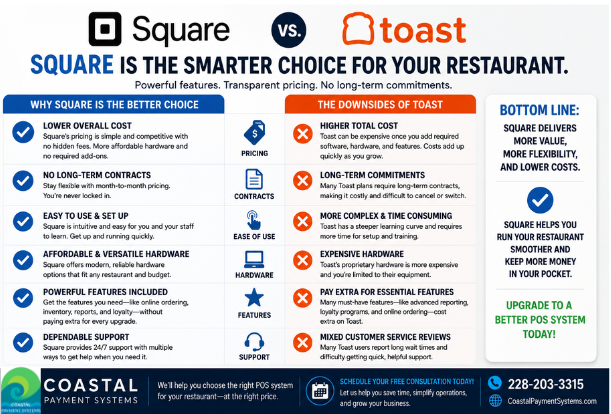
Coastal Payment Systems offers Square POS and can help you evaluate which capabilities fit your business, along with the subscription, equipment, and setup needed to use them.

Explore Square POS With Coastal Payment Systems
More features only matter when they solve problems in your business.
Whether you operate a restaurant, retail store, service business, or multiple locations, Coastal Payment Systems can discuss Square POS options and help you evaluate the hardware, software, and payment setup that fits your needs.
Already using Square? Let’s talk about whether your current setup is doing everything your business needs.
Contact Coastal Payment Systems to explore Square POS.
Visit coastalpaymentsystems.com.
Feature access depends on subscription, device, account eligibility, configuration, and rollout timing


Comments